WhatsApp Business · 9 min read
How to Create a WhatsApp Click-to-Chat Link and QR Code for Your Business
Build a wa.me click-to-chat link with a prefilled message, turn it into a QR code, and place it on bios, flyers and receipts so Nigerian customers can reach you fast.
By Noah Precious · Published 28 October 2026
Key takeaways
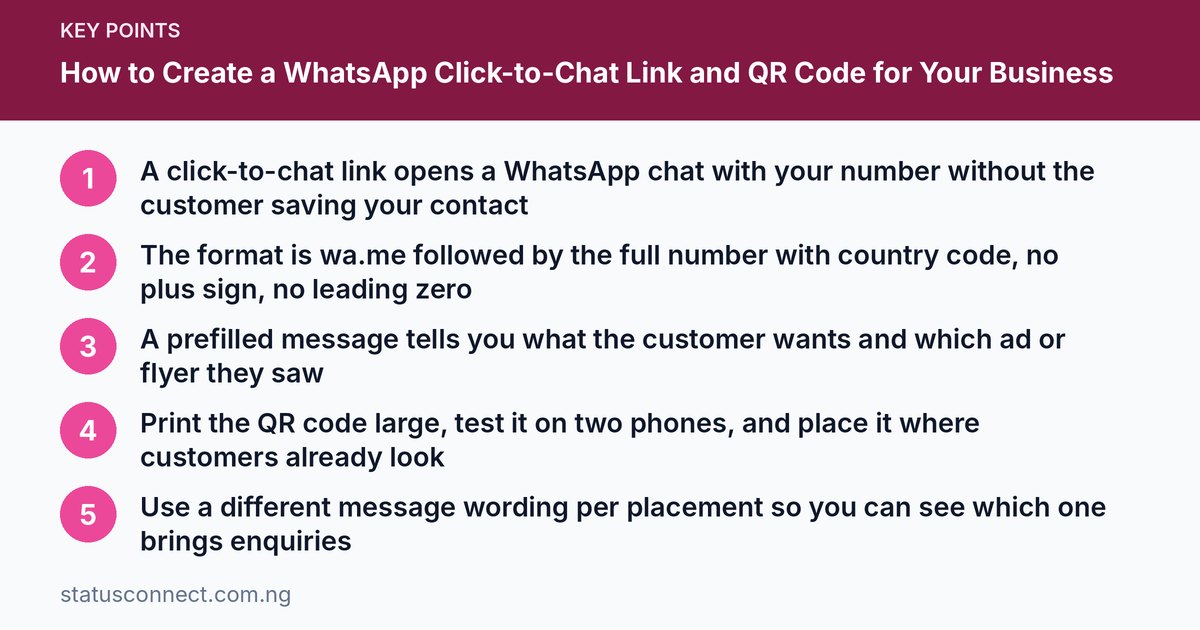
- A click-to-chat link opens a WhatsApp chat with your number without the customer saving your contact
- The format is wa.me followed by the full number with country code, no plus sign, no leading zero
- A prefilled message tells you what the customer wants and which ad or flyer they saw
- Print the QR code large, test it on two phones, and place it where customers already look
- Use a different message wording per placement so you can see which one brings enquiries
Every extra step between a customer and your chat costs you sales. Think about the usual routine: someone sees your flyer, copies your number, saves it as a contact, opens WhatsApp, refreshes contacts, finds you and then types a message. Many people give up halfway.
A click-to-chat link removes all of that. One tap, and WhatsApp opens a chat with your number, sometimes with a message already typed. A QR code does the same job for people standing in front of your shop, flyer or receipt. Both are free and take only a few minutes to set up.
What a click-to-chat link is
It is a normal web link that starts a WhatsApp conversation with a specific phone number. When a customer taps it, their phone opens WhatsApp (or WhatsApp Web on a computer) with a chat to your number ready. They do not need to have your number saved first.
It works with the regular app and the WhatsApp Business app. If you have not set up the Business app yet, start with our WhatsApp Business setup guide.
The link format
The basic format is:
https://wa.me/ followed by your full phone number in international format.
The rules are strict, and most broken links come from breaking one of them:
- Use the country code, which is 234 for Nigeria.
- Do not include a plus sign.
- Do not include a leading zero from the local number.
- No spaces, dashes or brackets. Digits only.
Here is a worked example using a clearly fake number. Suppose the local number is 0800 000 0000. Remove the first zero, put 234 in front, and remove all spaces:
- Local format: 08000000000
- Without the zero: 8000000000
- With country code: 2348000000000
- Final link: https://wa.me/2348000000000
Replace that fake number with your own, in the same pattern. For example, a number that starts with 0803 becomes 234803 followed by the remaining digits. Always test the link before you print or post it.
Add a prefilled message
You can add a ready-made message that appears in the chat box when the customer taps the link. Add ?text= after the number, followed by your message. Spaces in the message are written as %20.
For example:
https://wa.me/2348000000000?text=Hello%20I%20saw%20your%20flyer%20and%20want%20to%20order
When someone taps it, the box shows: "Hello I saw your flyer and want to order". The customer still has to press send, so the message is a starting point, not an automatic post.
Many free link generators on the web will encode the message for you. Choose a trusted one, and never type any password or private detail into such tools. Special characters, such as the naira sign, ampersands and line breaks, can be tricky, so keep the message simple and test it.
Good prefilled messages
A good prefilled message does three things: it tells you the source, the product and the request. Compare these:
- "Hi" tells you nothing.
- "Hello, I saw your Instagram post about the ankara bags and want to know the price" tells you the source and the product.
Keep it short, friendly and in plain English. If your customers prefer Pidgin, you can write it that way, as long as it matches your brand.
Make a QR code from your link
A QR code is just your link converted into a square picture that a phone camera can read. There are two common routes:
- Inside the WhatsApp Business app. The Business app has a short link and QR code feature in its settings, and the exact menu name varies by phone and version. Look for something like "Short link" or "QR code" in the business tools area.
- Use a QR code generator. Paste your wa.me link into a reputable generator, download the image at a high resolution, and save it. Stay with well-known tools, and avoid ones that make you register with personal information or ask for payment for a basic code.
Whichever route you use, test the finished code on at least two different phones, one Android and one iPhone if you can. Then do a test from a distance similar to where customers will stand.
Design tips for the QR code
- Keep high contrast. Dark code on a light background scans best.
- Leave white space around the edges. Do not crowd it with text.
- Print it big enough. On a flyer, a small thumbnail is hard to scan. A signboard needs a much larger code.
- Add a short instruction, such as "Scan to chat with us on WhatsApp", and also print the number or the short link for people who cannot scan.
- Avoid shiny, wrinkled or curved surfaces where glare or damage can stop the scan.
- Do not stretch or recolour it so much that the contrast disappears.
Where to place your link and QR code
Put it where your customers already are:
- Instagram, TikTok and Facebook bios. Use the link in the profile link field. Compare which platform suits you in WhatsApp vs Instagram vs TikTok for Nigerian sellers.
- Your Google Business Profile. If you have one, add the link in the field for website or messaging links, subject to what is available for your listing. Rules and options are on the Google support site.
- Flyers and posters. Place the QR code near your offer and a short call to action.
- Receipts and invoices. Tell customers to scan for reorders, tracking or complaints.
- Packaging and delivery bags. A small sticker can bring repeat orders. This works well with the ideas in how to get customers without ads in Nigeria.
- Shop windows, counters and stalls. This is useful in markets, malls and roadside shops in Lagos, Abuja or Port Harcourt where passers-by have a few seconds.
- Business cards and email signatures.
- Your WhatsApp Status. Post the link along with a clear offer. For ideas on what to post, see WhatsApp Status content ideas for vendors.
- Your WhatsApp Channel or website, where people can tap straight through.
Simple ways to track what works
WhatsApp does not give you a detailed marketing dashboard for a basic link, but you can still learn a lot with simple habits:
- Use a different prefilled message for each placement. For example, "Hello, I saw your flyer" for print, and "Hello, I found you on Instagram" for your bio. When a message arrives, you know where it came from.
- Use labels in the Business app. Tag new chats by source, such as Flyer, Instagram or Receipt. Our catalogue guide also shows how to keep products organised for those customers.
- Keep a simple notebook or spreadsheet. Record the date, source and whether the enquiry became a sale.
- Ask new customers how they found you, and write it down.
- Review monthly. Keep what brings buyers, and drop placements that bring only time-wasters.
Link shortening or tracking tools exist, but only use well-known services, and check that they do not break the link. Be cautious, because some short links hide where they go and customers may not trust them.
Common mistakes to avoid
- Including the plus sign or the leading zero. This is the most common cause of a broken link.
- Using spaces in the number or message.
- Not testing. Test every link and code before you print hundreds of flyers.
- Printing a tiny code. If you must squint, customers will not bother.
- Using a number you may change. If your number changes, printed materials become useless. Use a stable, dedicated business number.
- Prefilled messages that are too long or that look like spam.
- Sending customers to a personal number that also receives family messages and private chats.
- Ignoring replies. A link brings people in, and slow replies send them away. Set a greeting and an away message in the Business app.
- Breaking messaging rules. Do not use links to bulk-message strangers. Read what WhatsApp marketing is allowed first.
Staying safe
Because your number is public on a link, expect more enquiries, and a few unwanted ones. Protect your account with two-step verification, never share your verification code, and be careful with payment requests. Fake buyers and fake payment alerts are common, so read our guides on spotting WhatsApp scams and accepting payments safely. For more detail on the business tools themselves, the WhatsApp Business website is the official source.
Also remember that once someone messages you, you are handling their personal information. Keep it private and use it only for the purpose they gave it, as explained in our article on the Nigeria Data Protection Act and WhatsApp contacts.
Frequently asked questions
Does the person need my number saved before using the link?
No. That is the main benefit. The link opens a chat with your number even if they have never saved it.
Is a click-to-chat link free?
Creating a wa.me link and a basic QR code is free. Normal data charges from the customer's network may apply when they use WhatsApp. Third-party tools may charge for extra features, so read the terms before paying.
Can I use the link with a landline or a number not on WhatsApp?
The number must be registered on WhatsApp. If it is not, the link will not open a working chat.
What if my link does not work?
Check for a plus sign, a leading zero, spaces or a missing country code. Make sure the number is active on WhatsApp, then try again in a different browser or on another phone.
Final thoughts
A click-to-chat link and QR code are small tools with a big effect: they turn interest into conversation in seconds. Build your link with the correct format, add a sensible prefilled message, test everything, and put it in front of customers in several places. Then keep track of what works and improve. If you want to connect with other sellers and share contacts easily, join the Status Connect community.